What are we trying to slove?
When connecting to an external API, there are a few common issues you might run into.
- Authenticated API uses an API Key and you need to keep this a secret.
- API hasn’t enabled CORS (Cross-Origin Resource Sharing)
The Solution - A local API Server with Proxy!
To solve these issues, we are going to create a local node API server that the client can make requests to, and then the server will make requests to the external API.
Depending on how you are serving your client, you may or may not, need to create a sever. If you are using a node server, with something like Express to server your site and your local files, congrats, you are most of the way there. If you are using something like Create-React-App, you will need to create a local API server. Something like server.js with a basic express app with end points will be great!
Once you have your server setup, you will need to add some end points. Take a look at the external API you are using, and decide what calls from that API you will need to make then you can design your local API to suit your app
One Server
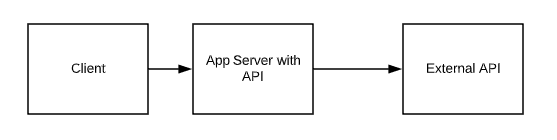
2 Server
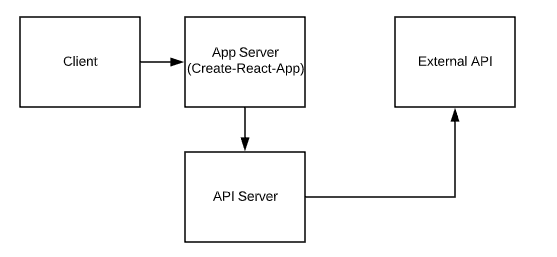
Conclusion
This solves the issues above in the following ways.
- If the external API uses an API key, you have now secured/hidden it on a server. It is no longer accessable to the client.
- CORS is a browser security issue, by making the request from a server you have solved that issue. In production, you would want to take steps to ensure this is more secure, but for development this is good enough.
Example with Create-React-App
- Create server.js file
- Setup Express in that file
- Add Endpoints, use something like node-fetch to make calls to the external API
- Create-React-App had built in tools to proxy, you will need to add
"proxy": "http://localhost:<PortNum of your server>/",of the rool level of the package.json file. - Now you can make requests in your app with fetch, something like:
fetch('/yourEndPoint)and then the Express app will actually make the API call to the exteral server.
For more info, here is where the inspiration for this post came from: https://github.com/fullstackreact/food-lookup-demo